
Help your child finish registration early, confirm identification and device requirements, and complete Bluebook exam setup on the device they will actually use. Then make the test morning simple: a clear route, a packed bag, and enough time to follow the admission ticket's instructions.
The student must register for SAT Weekend through their own College Board account. Parents can help with planning, payment, transport, and checking details. Keep the student involved so they can sign in, recognize the correct test, and explain a problem to staff without depending on a parent outside the building.
This guide combines official requirements with an original household planning system. Links to College Board policies were checked on October 25, 2026. Suggested planning buffers and family routines are editorial recommendations, not official deadlines. Your current registration, admission ticket, approved accommodations, and College Board instructions take priority over any general checklist.
First confirm whether this is SAT Weekend or School Day
Before opening a registration form, ask which administration the student intends to take. SAT Weekend and SAT School Day have different organizing arrangements. A student taking the test through school should follow the school's instructions rather than assuming that a weekend registration is required for that event.
Contact the school if the student has heard about an upcoming test but has no written details. Ask whether the event is confirmed, who is eligible, what the school handles, what the family must complete, and whether a separate fee applies. Keep the answer with the family calendar. A classmate's recollection is a useful prompt to investigate, not confirmation of registration.
For SAT Weekend, begin at College Board's registration hub. It links to online registration, deadlines, fees, fee waivers, and support. Use the official site rather than a search advertisement for a third-party preparation service. Paying for a course does not register a student for the official SAT.
Create a simple event record: administration type, date, location, registration status, student account email, device plan, identification plan, and any accommodation task. Do not include the password in a shared calendar. Label an intended date “planned” until the registration is actually confirmed.
If your family is still choosing a date, use our SAT timing guide first. Logistics work is easier when the date serves a real purpose and fits the student's school commitments. You should not discover an unavoidable exam conflict after completing payment.
Let the student own the registration account
College Board's registration instructions state that the student registers for themself; a parent or counselor cannot do it for them. Sit together if help is useful, while letting the student enter and review their information. This also gives them practice navigating the account they will need later.
Before creating anything new, ask whether the student already has a College Board account from another activity. If they cannot access it, use the official recovery process. Creating a second account because the first password is inconvenient can make the family's records harder to understand. Resolve access before the registration deadline is close.
Choose an email the student can reliably receive and check. If a school address may be disabled after graduation or filters outside messages, discuss an appropriate long-term address and the account's update process. The goal is continuity, not a parent-only inbox that leaves the student unable to retrieve a message on test morning.
Store credentials in an agreed secure place. Verify that the student can sign in independently on the testing device. A saved browser session can create the illusion that the password is known until the student opens a different app. Do one deliberate sign-in check well before test week.
A parent can keep a task list without holding every secret. Record “account access checked” and the date, rather than copying login details into a document that also contains school information and identification scans. Shared planning should reveal who is doing what, not expose everything the student uses to authenticate.
Build a deadline sheet from official pages
Copy the relevant test date and deadlines from the current SAT dates and deadlines page. Write the year as well as the month and day. A screenshot from last year's parent group can look familiar while referring to an entirely different cycle.
Keep official deadlines separate from household targets. For example, your family might aim to complete registration a week before the official deadline so there is time to resolve a payment or identification question. That earlier date is a planning buffer you chose. Labeling it clearly prevents someone from treating it as College Board policy.
Record the time zone whenever an official deadline specifies one. A family outside the United States should convert carefully rather than assuming midnight locally. Daylight-saving changes can make a remembered time difference wrong. Use the actual date of the deadline when checking the conversion.
Add related tasks that can require more lead time, such as accommodations or requesting a loaned device. Those are separate processes. Successfully registering near the ordinary deadline does not mean every support arrangement can be completed on the same schedule.
Finally, connect the test to the destination that needs the score. Check the expected release and each college or scholarship's accepted testing and reporting rules. The score and retake guide explains that decision. Registration is only useful if the resulting attempt can serve the purpose for which the student is taking it.
Choose a test center the family can reach reliably
During registration, consider more than one practical location. College Board notes that seats are not available at every center and that availability appears in the registration process. A school listed in a search result is not necessarily a confirmed seat for the date your child wants.
Compare the actual journey. Check the building address, likely entrance, parking or drop-off arrangements, and public transport at the required time of day. A familiar school name may refer to a campus farther away than expected. Save the location from the confirmed registration rather than relying on a vague map search.
If the trip is long, compare a same-morning journey with an overnight stay using real costs and the student's needs. There is no universal distance at which a hotel becomes necessary. A familiar home routine may suit one student; avoiding a very early drive may suit another. Choose the option that the family can execute reliably.
Build a backup transport plan. That could be another adult, a verified earlier bus, or a different route. Do not assume that an on-demand ride will be available in a remote area at dawn. A backup should be something the family has actually checked, not a comforting phrase in a document.
Once the registration is complete, tell everyone involved which center is confirmed. If the family later changes it, update the calendar, transport plan, and saved directions together. Multiple old addresses scattered through messages create avoidable confusion. Keep one current event record and mark superseded details as obsolete.
Check the student's name and physical identification early
Identification should be a registration task, not something first considered while packing. College Board requires acceptable physical identification and matching information; a nickname on a registration can create a problem when the ID shows the student's legal name. Review the current ID requirements for the student's age and testing location.
Put the actual document beside the registration details. Compare the name carefully, including the way names appear when the family uses more than one naming convention. If you see a mismatch, use College Board's official correction or support process. Do not assume staff at the door can waive an unresolved discrepancy.
Check that the document is current, legible, and recognizable. A photo on a parent's phone is not a replacement for the required physical original. If a passport is needed, locate it early enough to discover an expiration or other problem while there is still time to respond.
For international testing, read the country-specific section rather than applying a U.S. example everywhere. College Board has additional rules for some locations and for testing outside the student's home country. A document that works for a local school event may not meet the SAT requirement in another country.
Store the identification securely until packing day and agree on who will retrieve it. Avoid carrying a passport around for weeks simply because it appears on the checklist. On test day, the student should know which pocket holds it and be able to present it without emptying every item onto a crowded entrance table.
Upload a registration photo that meets the policy
A successful upload does not by itself prove that the photo is acceptable. College Board distinguishes file acceptance from compliance with its photo rules. Read the photo requirements and examples while selecting the image, rather than treating any recent social-media photo as suitable.
Choose a clear head-on image with the student alone and readily recognizable. Avoid filters, dramatic shadows, cropped faces, or a group photograph where another person remains visible. The point is identification, not producing a flattering portrait. Let the student see the final crop before submitting it.
If a current photo is needed, take it in good light against a simple background and compare it with the official examples. You do not need a complicated photo session. A few minutes spent following the requirements is more useful than an expensive image that obscures the student's features.
Keep the submitted image private. A registration photograph is not content for the family's public announcement of the test date. If another adult needs to help, share through a deliberate channel and remove unnecessary duplicate copies after the task is finished. Do not scatter identifying files across group chats.
Once the photo is accepted in the workflow, complete the rest of registration and review the confirmation. Families sometimes remember finishing the upload and mistakenly infer that payment and seat selection also finished. Verify the final state of the registration itself. One completed step is not evidence that the entire process is done.
Understand fees before authorizing payment
Review the current official fee page for the student's testing location. College Board separates U.S. test fees from international charges and lists additional services separately. Use the total shown for the actual registration rather than a price remembered from a sibling's experience.
Ask what each charge represents. The base registration, late registration, a location change, cancellation, and a score-related service are different items. Do not assume that changing a date is a free edit. Check the current registration-change instructions before paying or canceling anything.
Agree on the household budget outside the checkout screen. The student should know who is paying, whether transport is included, and whether the family has planned for a possible later attempt. A clear budget can reduce tension without suggesting that the child owes the family a particular score in exchange.
Retain the confirmation and necessary payment record in a private folder. You need enough information to resolve a duplicate charge or verify what was purchased. You do not need a screenshot containing full payment details in a broadly shared document. Record the date, amount, and registration status in the planning sheet.
If a payment appears to fail, check the account and confirmation before submitting repeatedly. An unclear browser message does not establish whether a charge or seat exists. Use official support when needed and preserve the relevant reference number. Guessing at the transaction state can create a second problem while trying to solve the first.
Investigate fee waivers without waiting for checkout
Families who may qualify should review College Board's fee waiver guidance early. Students can speak with a school counselor or use the official request route described there. Read the current eligibility conditions and benefits rather than assuming that every student outside the U.S. is treated the same way.
A useful first conversation is specific: “We want to understand whether our student qualifies and what needs to be completed before registration.” Ask which documents or adult verification the process requires. Do not submit private household records to an unofficial helper offering a code online.
Put the request and the test registration on the same task sheet, with separate statuses. “Asked the counselor” is different from “benefits available in the account,” which is different from “test registration confirmed.” Keeping those stages distinct makes it easier to identify where help is needed.
If the student is homeschooled or has recently moved, use the official guidance for that situation and ask a precise question when the process is unclear. A family should not conclude it is ineligible simply because the first school contact does not know the answer. Equally, uncertainty is not permission to enter information that is untrue.
Protect the student's dignity in household discussion. Financial assistance is an administrative resource with eligibility rules, not a measure of a student's worth. Handle it calmly and privately. Once the benefits and registration are confirmed, return attention to preparation and logistics rather than repeatedly reminding the student what the family could or could not afford.
Start accommodations planning well before test week
If your student needs accommodations, consult the school's appropriate coordinator and College Board's accommodations request guidance. College Board says its approval process can take up to seven weeks. Check the specific current deadline and process for the intended administration; the ordinary registration deadline is not a substitute.
A school support plan does not allow a family to invent the SAT testing arrangement. Confirm what College Board has approved and what the registration reflects. The right question is operational: what is approved, for which assessment, and what must happen for the student to use it? This guide does not diagnose eligibility or recommend a medical accommodation.
Keep documentation and decision letters in a secure place. Share them only with the people and official systems that need them. A general family calendar can say “confirm accommodation applied” without listing a diagnosis or attaching an evaluation report.
After approval, review College Board's after-approval instructions. Confirm that the arrangements apply to the intended registration. If something is missing or unclear, contact the coordinator or Services for Students with Disabilities promptly rather than expecting a proctor to redesign the administration on test morning.
Practice with the approved format and tools where available. The student should know what the arrangement feels like before the scored test. Ask what equipment they must supply and what the center provides. Small operational details matter: the family needs a concrete list, an owner for each task, and a confirmation date.
Choose a supported testing device, not just a convenient screen
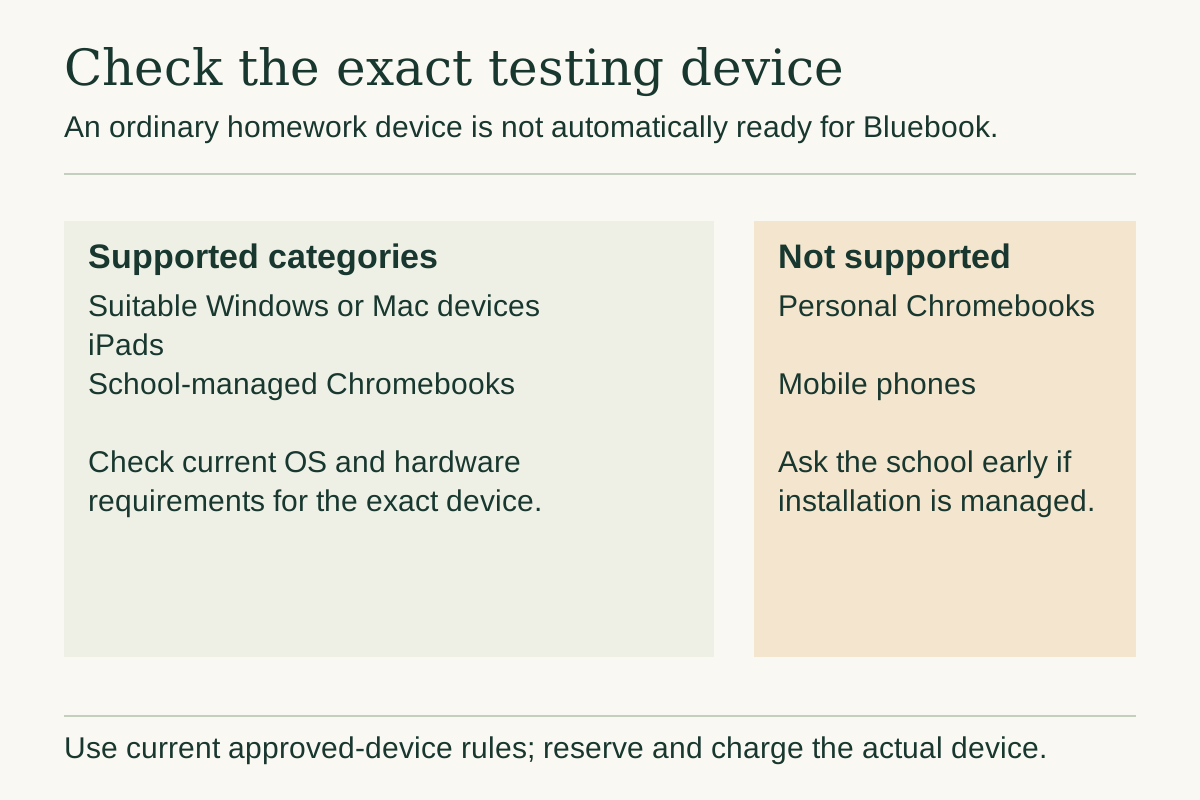
Use the current Bluebook approved-device requirements. The supported categories include suitable Windows and Mac devices, iPads, and school-managed Chromebooks. Personal Chromebooks and mobile phones are not supported testing devices. Exact operating-system and hardware requirements change, so compare the particular device with the current page.
Check who controls installation and settings. A school-managed device may require an administrator's help. Ask early enough that a blocked installation does not become a Friday-afternoon emergency. A machine that works for homework has not automatically been prepared for Bluebook.
Choose the actual device before the final setup window when possible. Have the student practice with its keyboard, trackpad or permitted mouse, screen size, and charging arrangement. Changing devices at the last moment can introduce unfamiliar controls even if both devices are technically supported.
Inspect the power situation. A worn battery that drains quickly during ordinary use deserves attention before the test. Bring the appropriate charging equipment, while recognizing that an outlet may not be available. Label similar household chargers so the student does not discover that the cable in the bag belongs to a different machine.
Keep the device available for the student during test week. A shared family laptop is a workable plan only if everyone knows it is reserved. Put that reservation on the calendar and agree on when it will be returned. Avoid a conflict in which another family member takes the machine to work on the morning of the SAT.
Request a loaned device as a separate task
If the student cannot access a suitable device, investigate the official SAT device-lending process. College Board currently requires a request at least thirty days before test day and says that submitting a request does not guarantee a loan. Read the full current instructions before assuming a device will be waiting.
Begin by asking the school whether a supported device can be borrowed and prepared. If the family borrows from a friend or relative, clarify that the student needs access for practice and setup as well as the scored administration. A device handed over at the entrance may not provide the preparation the student needs.
When using College Board's route, track registration and the device request separately. Record when the request was submitted, any required verification, the status, and the instructions received. Put a follow-up date on the household task sheet if confirmation has not arrived.
A loan arrangement may change the test-morning procedure. Follow the current instructions for arrival and exam setup rather than applying the ordinary at-home ticket workflow without checking. The student should know what will happen and which items they still need to bring.
Do not quietly switch to a friend's unsupported device because approval is uncertain. Contact the official support route and ask what options exist. The family needs an actual supported plan. A hopeful assumption about equipment is not the same as a confirmed loan, and discovering the difference after traveling to the center is costly.
Rehearse the practical routine before the final week
A practice session can test logistics as well as content. Have the student use the planned device in a quiet setting, arrange scratch work, and practice navigating Bluebook. The goal is to identify a small operational obstacle while there is time to fix it.
Notice mundane problems. Does the student know the login? Is the screen comfortable to read? Does the charger fit? Is a school restriction blocking the app? Does the student instinctively reach for a phone whenever they pause? Those observations help the family prepare a realistic routine without dramatizing test day.
Use unfamiliar practice appropriately rather than repeatedly chasing a flattering score on the same test. The parent study-plan guide explains how to combine practice and review. A rehearsal should produce a few useful actions, not a long list of reasons to worry.
Try the travel route if the location is unfamiliar and the effort is reasonable. At minimum, check the exact address, the likely entrance, and any obvious road or transport disruption. Do not assume that a map's shortest route includes a usable school entrance at the required time.
End the rehearsal with a small repair list: recover the password, ask IT about installation, replace a faulty cable, or verify an entrance. Assign each item to someone and check it once. Repeatedly rehearsing already solved details can increase family tension without adding preparedness. The purpose is to remove real uncertainty, not manufacture a perfect performance ritual.
Complete exam setup and obtain the current admission ticket
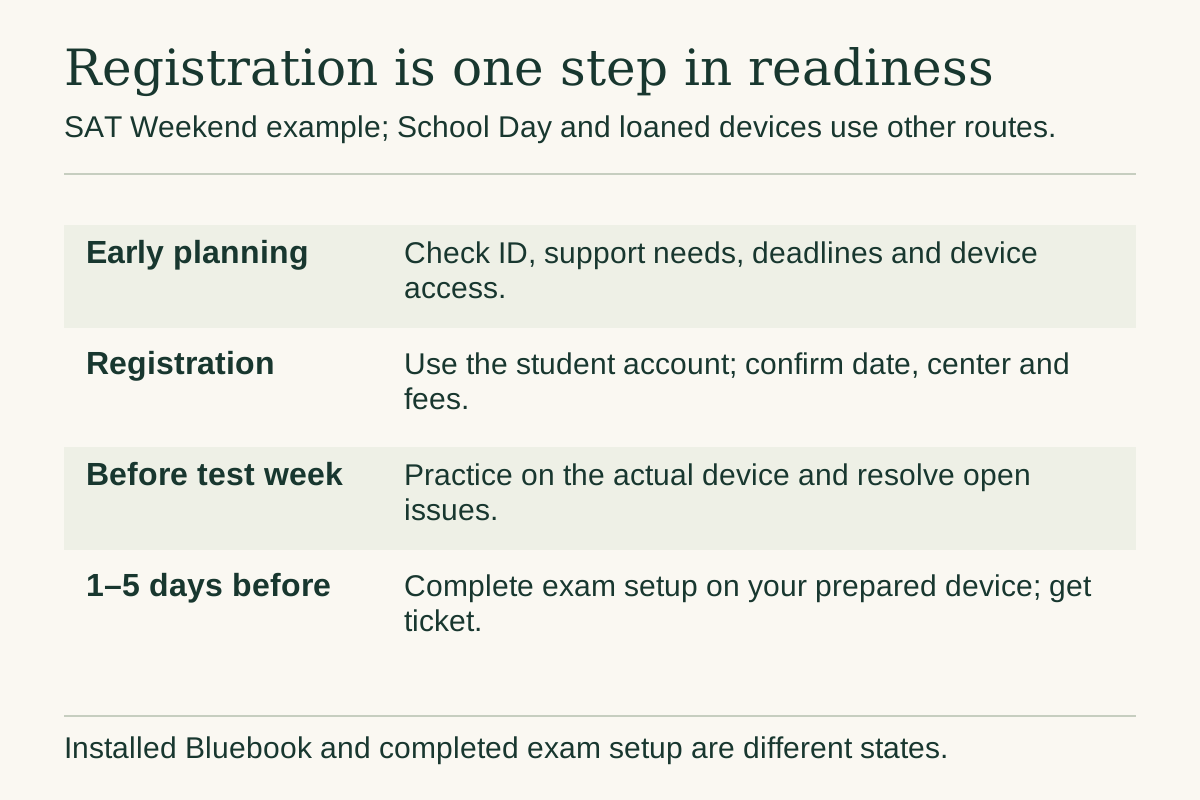
College Board's what-to-bring guidance tells students using their own prepared device to complete Bluebook exam setup in the one-to-five-day window before testing. The admission ticket becomes available through that process; a printed ticket is preferred. Follow separate instructions if College Board is lending the testing device.
Have the student open Bluebook on the device they will use, sign in, and read the prompts. A parent can sit nearby to help organize questions, but the student should see the process rather than receive a finished printout without understanding where it came from.
Check the ticket against the current event record. Confirm the student, date, center, arrival instructions, and any relevant approved arrangements. If there is a discrepancy, use the official help route promptly. Do not alter a document yourself to make it match what you expected.
Print the current ticket and place it in the chosen folder with the identification plan. If the family has no printer, arrange access early through a school, library, or another practical option. Do not spend the last evening discovering that the ink is empty or the file is on a device nobody can access.
Mark setup as completed only after the process actually finishes. “Bluebook installed” and “exam setup complete” are different states. The family checklist should make that distinction obvious. It should also say where the ticket is stored so that a second adult can help without restarting the process.
Pack the testing bag with a short, verified list
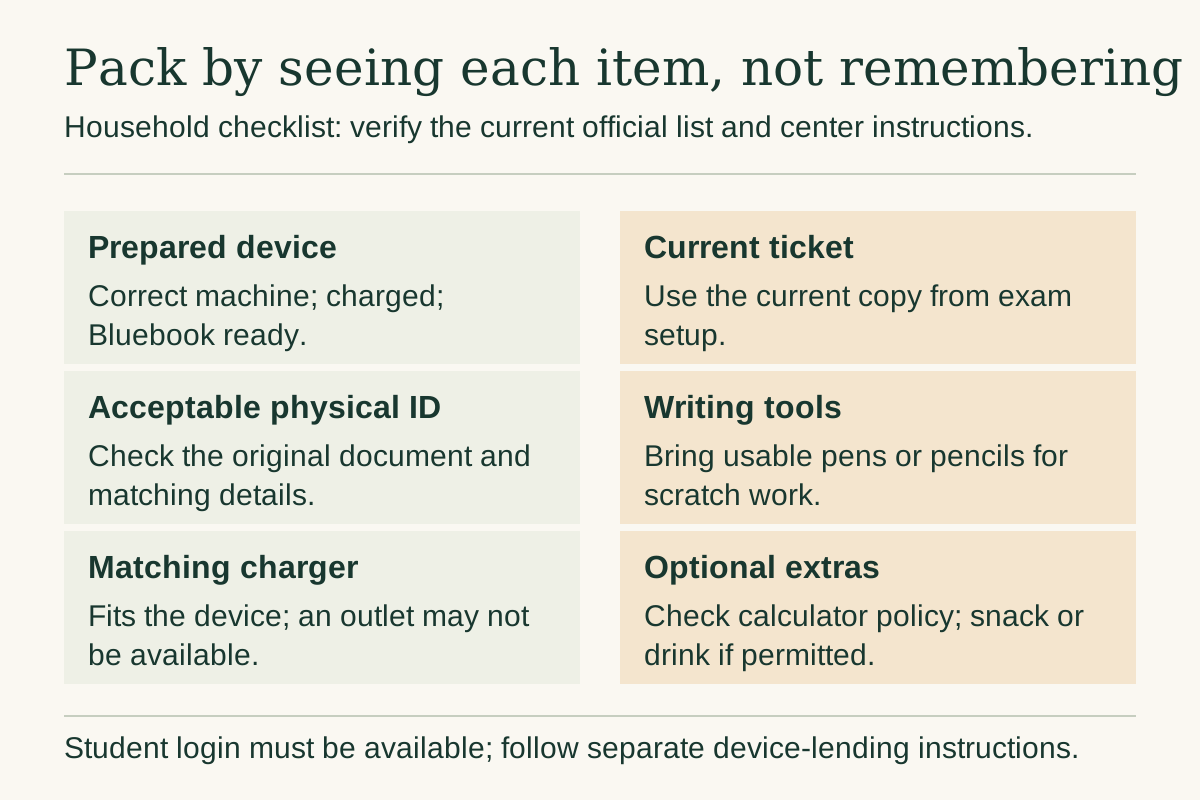
Use the current official packing list as the authority, then make the physical bag match it. The core items include the prepared, charged device, current admission ticket, acceptable physical ID, pens or pencils for scratch work, and access to the student's login. If bringing a handheld calculator, verify that exact model under the current policy.
Useful extras can include appropriate charging equipment and food or drink for the break, subject to the center's instructions. Pack what the student recognizes and knows how to use. A borrowed accessory with an unfamiliar switch can be more distracting than helpful.
Here is a household packing check, to be completed by seeing each item:
| Item | Practical check |
|---|---|
| Testing device | Correct device, charged, Bluebook prepared |
| Ticket | Current copy in the agreed folder |
| ID | Required physical original, not a phone image |
| Charging equipment | Fits the device and is in the bag |
| Scratch-work tools | A few usable pens or pencils |
| Optional calculator | Exact model checked and familiar |
| Break supplies | Familiar snack and drink where permitted |
Do the check with the student. Ask them to point to the ID and ticket, then close the bag. Avoid rearranging it secretly afterward. A parent who moves the passport into a “safer” pocket without telling the student can undo the benefit of careful packing.
Use a final note for anything that cannot be packed until morning, such as the charging device. Put the note somewhere visible and assign responsibility. The checklist should reduce memory demands, especially in a household where several people are leaving at once.

Check calculator and prohibited-device rules again
Read the current calculator policy before choosing a handheld model. College Board now states that calculators with computer algebra system functionality are not allowed for SAT Suite tests. Do not assume that an older recommendation or a familiar graphing-calculator brand makes every model acceptable. Bluebook includes its own calculator.
Also review the prohibited-device rules. Unless an approved accommodation provides otherwise, restrictions apply during testing and breaks. Phones, smartwatches, wireless audio devices, and other listed items cannot simply be used because the timed module has paused. Follow staff instructions for storage or collection.
Make the household plan specific. If the student usually wears a smartwatch, decide where it will stay before leaving home. If a phone is needed for pickup, explain that it must be handled according to the test center's rules. A phone can serve the journey without becoming an accessible break-time device.
Do not add unapproved comfort equipment to the bag on the assumption that staff will overlook it. Check the rules for items such as headphones, earplugs, styluses, external keyboards, and privacy screens. Accommodation-specific instructions may differ, so follow the student's actual approval rather than another family's arrangement.
The parent should also avoid messaging during the test expecting a reply. Agree on a pickup plan before arrival. The student does not need to monitor family logistics while staff are enforcing device rules. One clear plan is safer and less stressful than repeated “Are you done?” messages.
Plan the day before without changing everything
The evening before the test is for confirming readiness, not rebuilding the student's routine. Check the current ticket, center updates, packed bag, transport, and device charge. Give the student an agreed stopping time for SAT work. There is little value in turning a logistical check into an unplanned late-night practice test.
Choose familiar food and a realistic bedtime routine. Avoid experimenting with supplements, unfamiliar energy products, or a dramatically different breakfast because someone online called them a performance trick. If the student has an established medical plan, follow appropriate professional guidance rather than changing it for the test.
Put the morning schedule in writing. Work backward from the arrival instruction, allowing for travel and an ordinary household delay. Include breakfast, dressing, retrieving the device from the charger, and leaving. A planning buffer is useful; an unnecessarily extreme wake-up time may simply create another strain.
Prepare the driver's or accompanying adult's plan too. Confirm fuel or transport tickets, the route, and where they can wait or return. If another child has an activity, resolve that conflict before morning. The student should not discover at breakfast that the family is negotiating who can take them.
Finish with a calm check-in: “Everything is ready. Is there anything practical you still need?” Let the answer be small. The night does not need a motivational speech, a score target, or a warning about money spent. The most useful parental contribution may be making the rest of the evening ordinary.
Use the admission ticket for the actual arrival time
College Board publishes a sample SAT Weekend schedule, but explicitly tells students to confirm their ticket's arrival instructions. Loaned devices and approved testing arrangements may affect timing. Use the student's current instructions rather than treating one internet schedule as universal.
On the morning, check for official center messages or closure information before traveling. Verify the destination if anything has changed. A saved calendar entry is useful only while it matches the current administration. Keep the driver's navigation and student's ticket aligned.
At the entrance, let the student manage the documents they have practiced locating. A parent can help them reach the correct building without trying to negotiate ordinary check-in from behind them. If there is a genuine issue, remain calm and follow the staff's direction.
Do not promise that lateness will be excused because traffic was bad or the family traveled far. Plan to arrive with a reasonable buffer and understand the current admission rules. If the family is delayed, use the appropriate contact path rather than inventing a remedy while driving.
Once the student goes inside, follow the pickup agreement. The end time can vary with the administration, approved accommodations, or an operational issue. Give the accompanying adult something practical to do and avoid sending pressure-filled messages. The student should leave knowing where to find the family, not worrying about whether a parent is angry at a later finish.
Teach the student what to do when something goes wrong
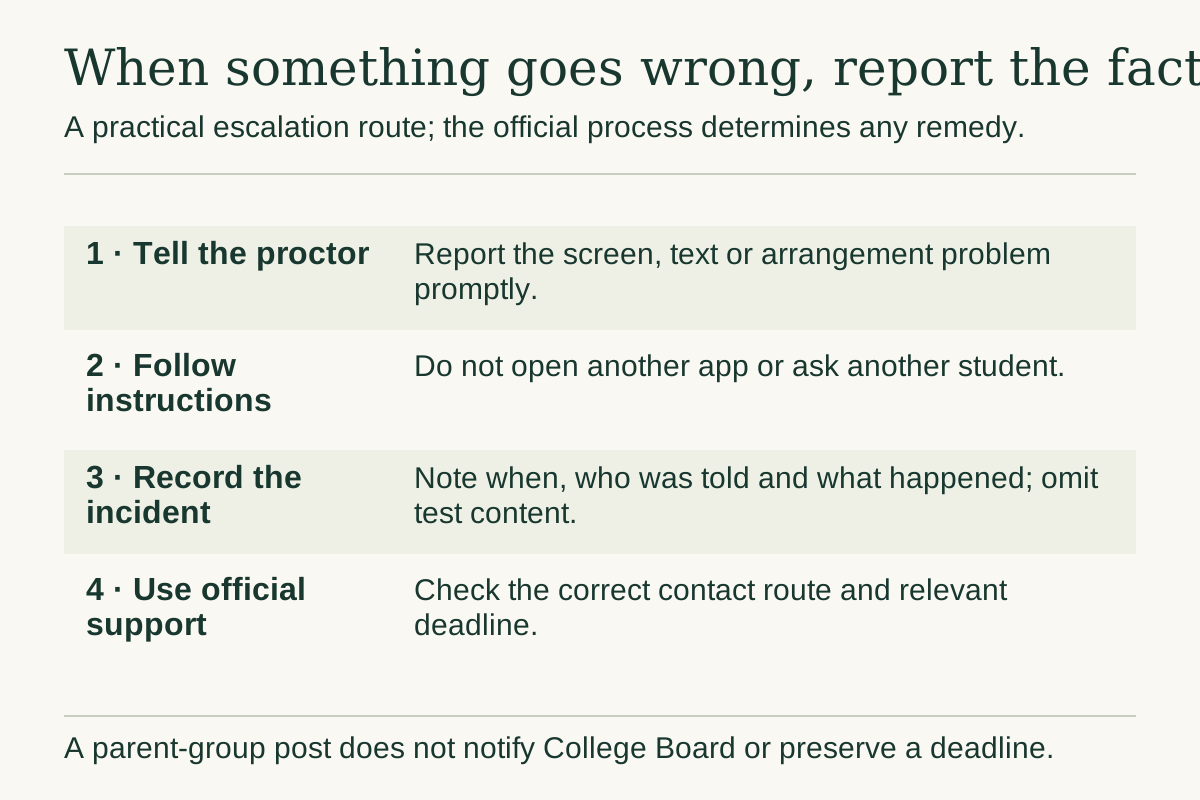
A student should know the simplest escalation rule: tell the proctor promptly about a procedural or technical problem and follow instructions. Do not improvise an unauthorized workaround, open another app, or consult another student. Practicing that sentence beforehand can make it easier to speak up.
Use ordinary hypothetical scenarios. “My screen froze.” “I cannot see the text properly.” “The approved arrangement does not appear to match what I expected.” The student does not need a technical diagnosis before reporting what they observe. Clear facts are more useful than a theory about why a system failed.
After the administration, write down a concise account while the details are fresh: what happened, approximately when, who was told, what instruction was given, and whether the issue was resolved. Keep secure test content out of the note. The purpose is to support a legitimate inquiry, not reconstruct questions.
College Board's contact guidance provides the current routes and deadlines for test-day problems. Use the correct process promptly. A complaint in a parent group does not notify the testing organization or preserve an official deadline.
Avoid immediately promising the student a refund, retest, score change, or other remedy. Those outcomes depend on the official process. You can promise practical help: “We will document it and follow the right steps today.” That keeps support concrete without creating an expectation that the parent cannot control.
Handle illness, absence, and cancellation as policy questions
If the student becomes ill or cannot attend, check the current registration and refund instructions. College Board's refund page explains cancellation timing and charges. Do not assume that an unused registration automatically transfers to another date or that every fee is refundable.
Keep registration cancellation separate from score cancellation after testing. They solve different problems and follow different procedures. Read the name of the action before confirming it. A hurried adult trying to help can click the wrong workflow if every task is casually called “cancel the SAT.”
For illness, prioritize the student's actual condition and relevant health guidance. This blog cannot decide whether a student is medically fit to attend. Work through practical options without framing a missed test as a failure of commitment. The schedule may be inconvenient, but pressure does not resolve illness.
If the student misses an administration, return to the purpose of testing before rebooking. Check remaining accepted dates and the family calendar. There may be a good replacement, or the original purpose may no longer be achievable. Our score and retake decision guide offers a way to weigh the next step.
Retain the confirmation of any official change and update the current event record. Remove obsolete travel reminders only after the replacement plan is clear. Preserve necessary payment evidence and support correspondence. A tidy calendar should not come at the expense of losing the information needed to resolve an open refund or registration question.
Coordinate two households or several caregivers clearly
When more than one household or caregiver is involved, put responsibilities in one short plan. Identify who handles payment, who confirms registration, who has the physical ID, who supplies the device, and who provides transport. The plan should respect the student's privacy while making practical ownership clear. Two adults can both be trying to help and still leave an essential item in the wrong house.
Choose a handoff time before test morning. If the laptop normally stays with one parent and the passport with another, verify that both reach the student before packing finishes. Use a factual confirmation such as “passport handed to Sam on Thursday evening,” rather than assuming that a text asking for it means the transfer happened. The same principle applies to chargers, approved equipment, and a printed ticket.
Agree on how updates will be shared. A changed center or arrival instruction should reach the transport adult and the student promptly, without requiring them to search a long conversation about unrelated family arrangements. Keep passwords, financial records, and accommodation documents out of that update thread unless there is a specific need and an appropriate secure method.
Give the student a copy of the practical plan they can understand. They should know who is driving, where pickup will happen, and what to do if the expected adult is delayed. Avoid making the child responsible for resolving adult disagreements about money or schedules on the night before testing.
Finally, name one person to check that the moving parts are complete. That person need not perform every task or take control of the student's account. Their job is simply to notice a gap early enough to fix it. Clear coordination is especially useful when the student's ordinary week already involves travel between homes, school, work, or caregiving duties.
Close the test-day loop with one short review
After pickup, start with a normal human question: “Would you like food, quiet, or to talk?” Do not require a question-by-question debrief in the car. The student may need time to come out of the testing environment before discussing anything useful.
Later, record three short observations if the student is willing: a practical thing that worked, a problem that needs follow-up, and a skill they want to revisit using legitimate practice. Avoid asking them to reconstruct secure material. Their impression of difficulty is not a reliable substitute for the forthcoming score report.
Check whether there is an unresolved official task, particularly if a technical or administrative issue occurred. Follow the current instructions and keep the relevant evidence private. Once the necessary follow-up is complete, stop refreshing the account every hour. Put the expected score-release information on the calendar and return to ordinary schoolwork.
When scores arrive, schedule a separate conversation. Read the report and application policies before deciding on another attempt. A difficult Saturday does not automatically require a retake, and a smooth morning does not guarantee the score the student hoped for.
The final household checklist should show what actually happened: registration confirmed, identification checked, device ready, setup completed, attendance or change recorded, and any support inquiry resolved or still open. Keep useful records and remove redundant drafts of the checklist after everyone has finished using them. Then let the student move on to the next chosen task.